30.6.22

zte c300 trunk mode

 gpon

  profile tcont PPPOE type 4 maximum 9900000

  profile tcont 100M type 4 maximum 100000

  profile tcont 50M-TRUNK type 4 maximum 50000

  profile tcont 50M-TRUNK-CLIENT01 type 4 maximum 50000

  profile traffic DW100M sir 90000 pir 100000

  profile traffic UP100M sir 90000 pir 100000

!

!

gpon

  onu profile vlan PPPOE tag-mode tag cvlan 10

  onu profile vlan 50M-TRUNK tag-mode tag cvlan 100

  onu profile vlan 50M-TRUNK-CLIENT01 tag-mode tag cvlan 200

!


vlan database

  vlan 1,10,20,100,200

!

vlan 10

  name PPPOE

!

vlan 20

  name MGMT

!

vlan 100

  name Vlan100-trunk-port1


interface gpon-olt_1/2/1

  no shutdown

  linktrap disable

  uncfg-onu-aging-time 30

  onu 1 type ZTE sn ZTEGC1DC06E0

  onu 2 type ZTE sn ZTEGC046AA6E


nterface gpon-onu_1/2/1:2

  sn-bind enable sn

  tcont 1 name 50M-TRUNK profile 50M-TRUNK

  tcont 2 name 50M-TRUNK-CLIENT01 profile 50M-TRUNK-CLIENT01

  gemport 1 name 50M-TRUNK tcont 1

  gemport 2 name 50M-TRUNK-CLIENT01 tcont 2

  service-port 1 vport 1 user-vlan 100 vlan 100 

  service-port 2 vport 2 user-vlan 200 vlan 200 


pon-onu-mng gpon-onu_1/2/1:2

  service 50M-TRUNK gemport 1 cos 0 vlan 100

  service 50M-TRUNK-CLIENT01 gemport 2 cos 0 vlan 200

  vlan port eth_0/1 mode tag vlan 100

  vlan port eth_0/2 mode tag vlan 200


pon-onu-mng gpon-onu_1/2/1:2

  service 50M-TRUNK gemport 1 cos 0 vlan 100

  service 50M-TRUNK-CLIENT01 gemport 2 cos 0 vlan 200

  vlan port eth_0/1 mode trunk

  vlan port eth_0/1 vlan all


interface xgei_1/19/1

  phy-attribute lan

  no shutdown

  hybrid-attribute fiber

  no negotiation auto

  speed 10000

  duplex full

  flowcontrol disable

  linktrap enable

  switchport mode trunk

  switchport vlan 1,10,20,100,200 tag

  port-protect disable

  uplink-isolate disable

15.11.21

discover the Radio password for GM/GP 300 series (Try with GP380 and GP388R).

 After some time I find a method to discover the Radio password for GM/GP 300 series (Try with GP380 and GP388R).


1. Connect the radio to the PC
2. Download a serial port sniffer (like portmon.exe) and start it
3. Push Read Radio on CPS interface
4. Return to the sniffer and find (around line 230-240) a line like this one (the last part of the line is always FF FF 00 00 00 00 00 00 00 )
233 0.04440711 gp300.exe IRP_MJ_READ Serial2 SUCCESS Length 36: 00 02 C0 32 41 30 31 30 39 03 19 CD FF FF 00 00 00 00 00 00 00
5. Take the 4 digits hex number before the last third. In this case 03 19 CD are the last third (before FF FF ...)
6. The password was 3039 in hex.
7. Find a hex-dec converter and convert 3039
8. Great: the password is 12345

Good hack :p :lol:

26.4.21

ROTARI DAN YAGI 2EL - 40M


ROTARI DAN YAGI 2EL - 40M

Untuk membuat yagi dan Rotari untuk 40m ( 7mc ), yang diperpendek dengan trap coil 80 lilitan rapat pada 1/2" pvc, agar tidak terlalu panjang yg semestinyatotal panjang 22m diperpendek menjadi 13,6M
Gambar .
  • Jika menginginkan menjadi 80m coil trap dibuat menjadi 160Lilit dengan kawat sama.

10.2.21

Installing Homebrew without XCode Install only the commandline tools


Install Command Line Tools

xcode-select --install  

When this is finished, you can install homebrew!

Install Homebrew

ruby -e "$(curl -fsSL https://raw.githubusercontent.com/Homebrew/install/master/install)"

You’re welcome!

7.2.21

MRTG 64Bit Counter Add Device


MRTG 64Bit Counter Add Device

root@mrtg-htsnet:/etc# cfgmaker –snmp-options=:::::2 htsnet@111.67.67.129 > /etc/mrtg-sw129.cfg

indexmaker /etc/mrtg-sw129.cfg > /var/www/html/mrtg/SW-129-MMR-IDC-3D-LT-3-CISCO-4948/index.html

Simple modification of the HM-36 Microphone from ICOM

There are two different types of ICOM microphone HM-36 (exclude chinese fake):

First type (old model) sounds well, but other type (new model since late 2007/begin 2008) sounds pretty bad. The difference between two types you can find very simple. Old type microphone has three wires in cable – Black, Red and shield (grounded wire). New type has only two wires. If you have mic of second type, perhaps you needed to modify it, because after modification you will feel that higher and lower frequencies becomes better.

You need follow next steps:

  1. Disassemble the housing of new type microphone
  2. Find on the PCB Potentiometer R1 (10 kOhm) and Capacitor C2 (10 uF).
  3. Remove them with soldering iron
  4. Replace capacitor C1 with other nominal. (Better will be nominal 0.01 uF)

For better quality C1 should be tantalum capacitor (Although type is no too critical, and also it can be ceramic).

That`s it. Now you can assemble your mic and test it. I hope you have got better frequency characteristic than before.


LSB on the Furuno Model FS1503

 To enable LSB on the Furuno Model FS1503 radio do the following:


You need to change system parameter 9914 to "0" to enable LSB capability.


System programming procedure:

While pressing and holding down the [CH] key, turn the power on to enter system programming mode, release the [CH] key after unit is on and "MEMO" shows in the display.


Select function 9999 by rotating the FREQ/CH knob.


Press [CH], [1], [5], [0], [3], and [ENT] keys. ("1503" is password.)


Select function 9914 by rotating the FREQ/CH knob, then press [CH], [0], and [ENT] keys.


To finish up, escape the programming mode by simply turning off the radio.


The system programming is completed.

18.8.20

CodeIgniter 4 spark error running

sumber : https://forum.codeigniter.com/thread-77086.html 

edit file php.ini

Auto-respone: if anyone is using xampp the quick way to fix this is open php.ini and uncomment:

extension=intl

------

Missing function:
// file: ./system/CodeIgniter/CodeIgniter.php

    /**

     * Handles some basic app and environment setup.
     */
    public function initialize()
    {
        // Set default locale on the server
        locale_set_default($this->config->defaultLocale ?? 'en');


edit menjadi sbb :


/**
     * Handles some basic app and environment setup.
     */
    public function initialize()
    {
        // Set default locale on the server
        if (function_exists('locale_set_default')) :
            locale_set_default($this->config->defaultLocale ?? 'en');
        endif;

        // Set default timezone on the ser

18.1.16

MERAKIT BITX 40M

MERAKIT BITX 40M
Saatnya mulai menshare pengalaman saya dalam merakit BITX.
Langkah awal untuk merakit BITX adalah :
1. Siapkan alat ukur sperti, avo meter, frekuensi counter
2. Alat kerja seperti, solder, timah, penyedot timah, pinset, skema BITX dll.
3. Bahan-bahan / komponen BITX seperti, PCB, Transistor, resistor, induktor, capasitor, kristal ( 5 biji )

========================

Bagian yang paling awal dirakit adalah BFO (Beat Frequency Oscilator ). 
Saya menggunakan kristal 8Mhz. Kita merencanakan membuat tranceiver 40m band ( 7 Mhz ) , sehingga LO ( Lokal Oscilator ) nya pada 1 Mhz atau di 15 Mhz.
Rangkailah Bagian BFO seperti pada skema di bawah ini :
Sambil membuat BFO, tes juga kristal-kristal lainnya catat frequencynya.


20.8.15

Mini Dipole 40m Band

https://www.qrz.com/db/YD8KKR


Loading Coil = Enamel 1,8mm , 90 turn , 1 inch diameter , 18cm length 


Magic Antenna , Just 3m total length open dipole for 40m band.......Ready to DX
Just need small space , you don't need a tower , you ready to DX just 7m high antenna from the earth.....


15.8.15

Antenna Mobil 2 MTR >> HF

ANTENA MOBIL 2 MTR 

CONVERT  KE HF


  • Siapkan Antenna VHF 2 mtr. (5/8 lamda), yang sudah di seting di Frek kerja 2 Meter.
  • Siapkan PVC 1" 11cm. + 2 dop 1".
  • Kawat email 1,5mm .
  • Pasang 2 Konektor pada dop PVC, atas untuk Female, bawah tuk Male.
  • Lilit Kawat email Untuk : 
- 27Mhz. 9 Lilit. spasi 0,5cm.
- 11 Mhz 28 Lilit. ( rapat ).
- 7 mhz 58 Lilit. ( Rapat ).
  • Biarkan untuk Output ( Female) hanya terpasang Iner nya saja. (+). untuk tersambung ke antena Larsen 2 meter.
  •  Siapkan Konektor SMA Jack Male & Female.

    Gambar :

Panjang Kabel Penyalur ( Coex ) 420cm + Braket ( Mount ), for HF ( standar ), Coil atau lilitan dalam keadaan terbuka dan tertutup ada perubahan.

Shortwave Antennas for 40m and 80m

Trying to use the shortwave bands for ham radio usually end up in the need of space for large antennas. Of course, the antenna should be "the larger the better" for these bands but sometimes there is no space available. I have also this problem as I only have a small balcony so I decided in trying to build extremely shortened antennas as this is common for mobile antennas. Here is a sketch of the layout:


I built two antennas, one for 40m and one for 80m and I had access to a professional vector network analyzer. The length of the radiator was choosen arbitraryly, then the parameter N1 was varied to find the right resonant frequency. After thatm the parameter N2 was varied to get 50 Ohm. The resonant frequency is independend of the parameter.

Here the results for the antenna for 40 m:
l=854mm
N1=59
N2=16
total length: 1.15m

And here the results for the 80 m antenna:
l=1500mm
N1=98
N2=18
total length: 2m

I used a PVC wastewater pipe with a diameter of 40mm. The radiator can be either fixed on that pipe too, or it can be installed in a separate pipe (one for electric installations in my case).

14.8.15

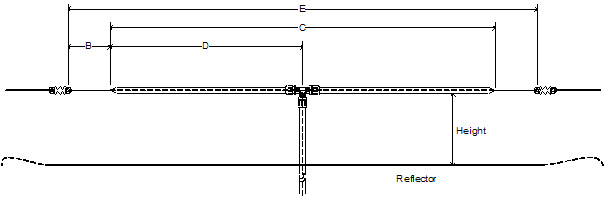
Double Bazooka NVIS Antenna Calculator


The measurements below are for building a Double Bazooka Near Vertical Incident Skywave (NVIS) Antenna. The End Wire Size can range from 16 AWG to 12 AWG. The larger the wire, the wider the bandwidth. 300 Ohm Twin Lead with the ends shorted is an option for even greater bandwidth.
The antenna is constructed from a single length of 50 or 75 Ohm coax with a coaxial feed point in the center. The span is opened in the middle to expose the braid from each half. The center conductor and dielectric is not disturbed and the two separated braids are then fed with the Coax Feedline. Each end of the coaxial span has the braid and center conductor shorted and connected to the end wires.
The antenna as designed is a broad band antenna with the coaxial cable's capacitive reactance changing to compensate for changes in inductive reactance across the band of operation. This helps to provide acceptable matches on frequencies other than what the antenna was specifically designed for. The antenna as fed matches reasonably well into a 50 Ohm Coax Cable Feedline and an antenna tuner.
A Ground Reflector can be added to enhance NVIS Propagation at frequencies below 10 MHz where NVIS Propagation is usable. The Ground Reflector can be a single conductor or several in parallel spaced a few feet apart. Hardware cloth or "Poultry Screening" is an option too. Several antenna / reflector elevation options are shown that enhance the NVIS vertical antenna pattern and propagation.


Please note: The calculations are approximate, so some final end wire length adjustment may be necessary. Dimensions will change slightly due to antenna height and ground conductivity variations...and Keep The Antenna Away From Power Lines. They are good at turning you into "The Squirrel in the Substation".

Please note: NVIS Propagation is only useful at frequencies below 10 MHz.


Double Bazooka AntennaNVIS Antenna HeightRef Dipole


 End Wire Length Ft (B)Coax Element Length (C)Coaxial Element Center (D)Total Length Ft (E)0.1 Wave1/8 Wave1/20 WaveReflector Length1/2 Wave Ft
160 Meters


1.837.50180.5690.28255.5652.0065.0026.00268.33260.00
1.935.53171.0585.53242.1149.2661.5824.63254.21246.32
233.75162.5081.25230.0046.8058.5023.40241.50234.00
80 Meters


3.519.2992.8646.43131.4326.7433.4313.37138.00133.71
3.618.7590.2845.14127.7826.0032.5013.00134.17130.00
3.718.2487.8443.92124.3225.3031.6212.65130.54126.49
3.817.7685.5342.76121.0524.6330.7912.32127.11123.16
3.917.3183.3341.67117.9524.0030.0012.00123.85120.00
416.8881.2540.63115.0023.4029.2511.70120.75117.00
60 Meters


5.330512.6660.9730.4886.3017.5621.958.7892.1987.80Ch1
5.346512.6360.7930.3986.0417.5121.888.7591.9187.53Ch2
5.366512.5860.5630.2885.7217.4421.808.7291.5787.21Ch3
5.371512.5760.5030.2585.6417.4321.788.7191.4887.13Ch4
5.403512.4960.1530.0785.1317.3221.658.6690.9486.61Ch5
40 Meters


79.6446.4323.2165.7113.3716.716.6969.0066.86
7.19.5145.7722.8964.7913.1816.486.5968.0365.92
7.159.4445.4522.7364.3413.0916.366.5567.5565.45
7.29.3845.1422.5763.8913.0016.256.5067.0865.00
7.39.2544.5222.2663.0112.8216.036.4166.1664.11
30 Meters


10.16.6832.1816.0945.549.2711.584.6347.8246.34
10.156.6532.0216.0145.329.2211.534.6147.5946.11
20 Meters


144.8223.2111.6132.866.698.363.3434.5033.43
14.14.7923.0511.5232.626.648.303.3234.2633.19
14.24.7522.8911.4432.396.598.243.3034.0132.96
14.224.7522.8611.4332.356.588.233.2933.9732.91
14.34.7222.7311.3632.176.558.183.2733.7832.73
14.314.7222.7111.3532.146.548.173.2733.7532.70
17 Meters


18.073.7417.998.9925.465.186.482.5926.7325.90
18.133.7217.938.9625.375.166.452.5826.6425.81
15 Meters


213.2115.487.7421.904.465.572.2323.0022.29
21.13.2015.407.7021.804.445.552.2222.8922.18
21.23.1815.337.6721.704.425.522.2122.7822.08
21.33.1715.267.6321.604.395.492.2022.6821.97
12 Meters


24.892.7113.066.5318.483.764.701.8819.4118.80
24.952.7113.036.5118.443.754.691.8819.3618.76
10 Meters


282.4111.615.8016.433.344.181.6717.2516.71
28.52.3711.405.7016.143.284.111.6416.9516.42
292.3311.215.6015.863.234.031.6116.6616.14
29.52.2911.025.5115.593.173.971.5916.3715.86

zte c300 trunk mode

  gpon   profile tcont PPPOE type 4 maximum 9900000   profile tcont 100M type 4 maximum 100000   profile tcont 50M-TRUNK type 4 maximum 5000...